Indie Games – Three Upcoming Titles

Over the years I’ve noticed a direct link between getting older and having less time to spend playing video games, I will never accept its because I am getting older but instead because I have more responsibility and more important things to do in life!

In reality I try to fit in time playing games in the precious spare minutes I get, but this limits me to short, straight to the point games. The past few years have been fantastic for a real explosion of talented game developers building games initially out of their bedrooms (and then later from their own, gold plated studios) which are just great fun to sit down and play.

One example of this is Dwarf Fortress, although not a new title, it highlights what can be done when you have a vision and passion to bring it to life. Minecraft is another, more recent, example of quality game development in the indie game scene.

While those are both games from the past, what is there in the future? Well I’ve gathered up a few up and coming games which I think look fantastic and should hopefully make an impact when they land.


FTL: Faster than light – http://www.ftlgame.com/

This is roguelike game, if you aren’t familiar with the style its a one-shot game format. You start with something, you build up your resource or character and dead is dead, no returning to the last checkpoint.

So how many times have you dreamt of commanding your own spaceship? Firing off orders, re-routing power, creating tactics for epic space battles etc. FTL is planning to bring all of that to life in a randomly generated universe. The premise is that you command a ship with numerous different systems that can all take damage and consume power. You can travel around the ship to effect repairs and keep the ship in order whilst you travel around the galaxy completing missions and dealing with random encounters. Have a look at the trailer they’ve posted on their site and there is a great PC Gamer hands-on preview which really gives you a decent idea of what to expect.


Castle Story – http://www.sauropodstudio.com/

Played Minecraft before? Right, now zoom out a little bit, imagine a Populous style game world below with numerous tribesmen to do your bidding. Replace the tribesmen with “Bricktrons” and then imagine each of them mining rock and other resources out of the ground and then building epic castles from the mined resources. At night the monsters will come so there is an element of survival too. Have a watch of the first game play to get a better idea of how its going to play it. If they get the balance right and give you enough to do then it could be pretty good fun.

Prison Architect – http://www.introversion.co.uk/prisonarchitect/

Remember Introversion? The Introversion of Darwinia and Uplink fame? Well they might not have been about for a bit but they’ve been busy. Their next title is a back to basics top down god style game. Again its simple in its design, create a prison, maintain the prison, look after the inmates etc. Although the graphics don’t look amazing I do remember the great fun to be had in the first ever Grand Theft Auto, which was entirely top down 2D graphics. If it works out I can see this being fantastic fun to play, we’ll have to wait and see the result.
Read More

Android Ice Cream Sandwich Review – Samsung Galaxy S2

A number of weeks ago I received my Ice Cream Sandwich update for my Samsung Galaxy S2, here are my thoughts on it so far in the form of a mini-review. If you’re sat reading this and wondering why you haven’t yet received it then try connecting your phone up to Klies (Samsung’s update and backup application), ICS arrives as a firmware update via Klies as opposed to an over the air (OTA) update.

Firstly the most obvious change is the interface, with each iteration Google like to tweak the interface and ICS is no different in this regard.

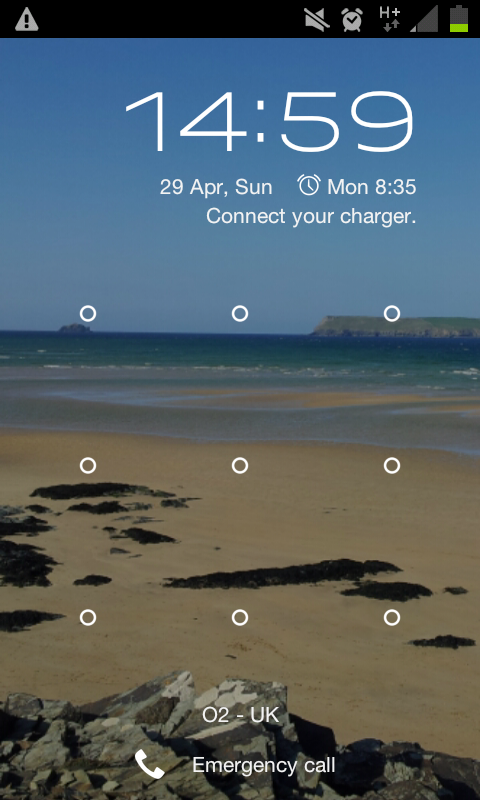
Lock Screen on ICSThe new look is sleek and modern, the interface also looks and feels more responsive. My only gripe would be that the touchscreen appears to have been re-calibrated with this update to be super responsive, sometimes when browsing a web page I find myself flicking the page back the other way because I don’t life my finger off the screen quickly enough. Also scrolling up and down through my contacts it can sometimes flick right or left to start a call or send a text, whilst on the previous version it would lock the sideways swipes until you finished scrolling.
Nothing dramatic but definitely a major annoyance while you’re adjusting to it.


Along with the enhanced interface they have also included a new data usage screen that I’ve found pretty invaluable since discovering it!

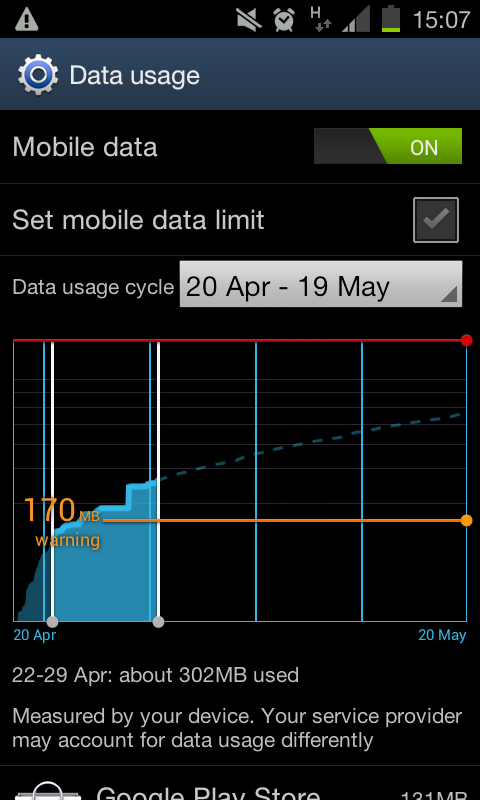
Data usage screenFirstly you can enable or disable it, monitoring your usage does cost battery but from the reports I’ve read it doesn’t make any noticeable impact, if you read my previous posts about my battery issues you’ll understand why I can’t confirm or test this at the moment.
Once enabled you can then set your billing period, for me it is the 20th of every month so that is when my data allowance restarts. On the summary chart you can touch and drag a line which will cause Android to pop up a notification if you hit the limit, you can also choose to make this your limit and the phone will restrict any data usage above this.Data usage screen

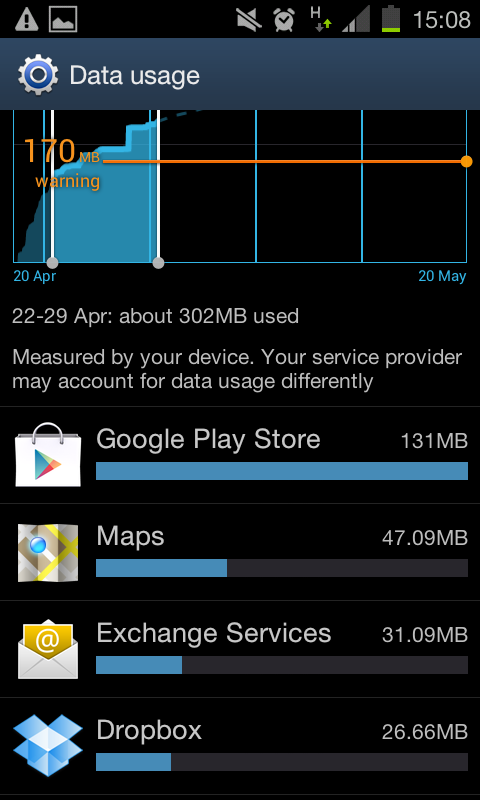
Below the chart is a list of the different services and apps that have been using data, in order of their amount of usage. It’s a great summary and from my experience it was within around 5-10meg of when my data allowance ran out which is pretty accurate, lets face it, if you get that close to your limit then 5-10meg is an acceptable margin of error.


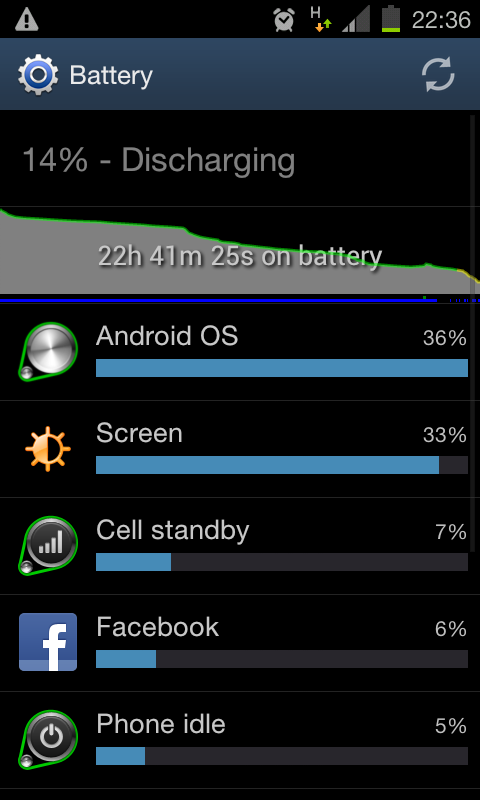
The power monitor is largely unchanged, if anything its a little more accurate. The same power overview is present at the top which can be clicked on to see a larger and more detailed breakdown of power usage. Under the chart and down the screen is a list of the different apps and services along with their power consumption. Although this is great for pointing you in the right direction, I do wish there was greater visibility on the power consumption by packages and services within wrappers such as “Android OS”. I appreciate the complexity of doing something like that along with the Battery Screenadditional strain it might put on the system but there’s no reason they couldn’t include it as a debug feature in the future.

The email client is the Samsung provided one and its a dream. For ICS it has been enhanced  and it looks and feels great. Unlike the vanilla OTB email client I had on my previous Android, which was a bit clunky but still good for being able to read emails, I have actually been able to work entirely from my phone. It has a great split-view if you orientate your phone into landscape with your emails down the left and a preview pane on the right. Control over peak/off-peak push notifications and the standard signature, security and download limit settings round it off as a pretty complete package.

Some other minor changes include the call answer/reject screen has been altered to appear as circles which you swipe out of to answer or reject a call. There is a new facial unlock feature that I have yet to try, but it comes with a warning that it shouldn’t be used as an actual security feature so… its kinda pointless… Finally there is an enhanced browser, woop? Personally it still works the same as the previous one, albeit a little quicker, but if you are like me then you probably don’t even notice the browser, its practically transparent in its ability to provide web content quickly and as needed, which is just how I like it.

Well worth the update for the enhancements but be warned that old or lower capacity batteries struggle, including the stock battery for the Samsung Galaxy S2. I was getting around 7 hours of usage before it was giving up until my new battery arrived this week! (I’ll post about that later).

Read More